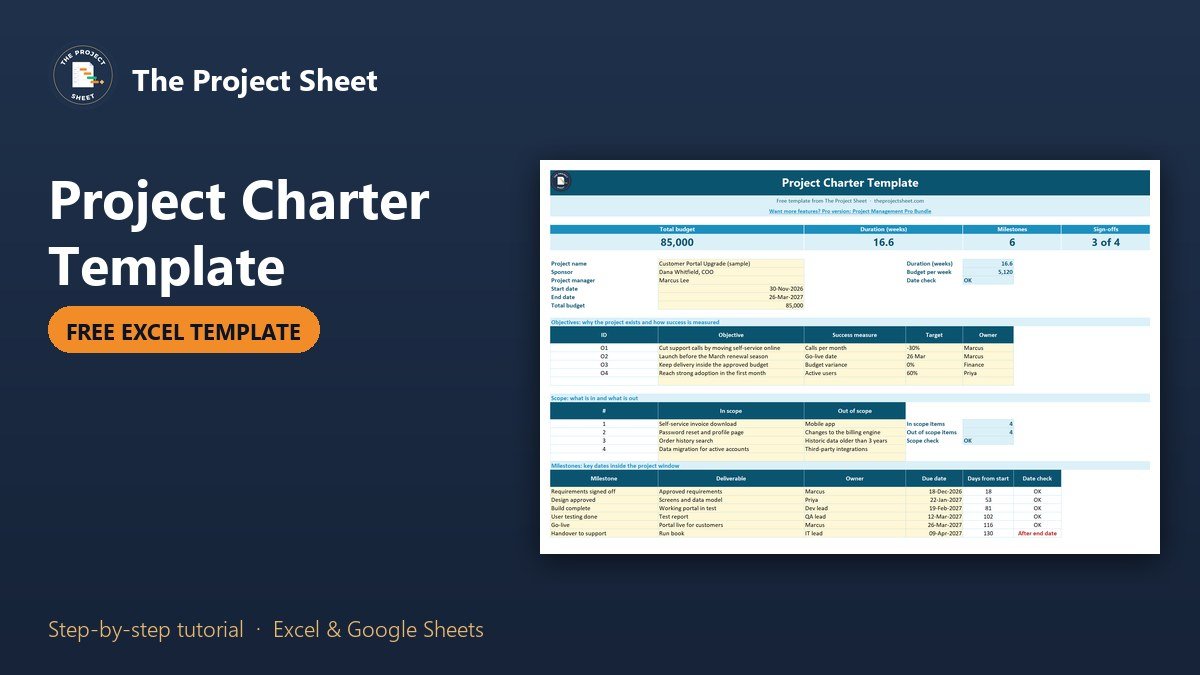
A project charter template is a one-page document that records why a project exists, what it will deliver, how much it can cost, when it ends and who has agreed to it. To build one in Excel, list the objectives, scope, milestones, budget, risks and sign-offs on one sheet, then add formulas that check the dates, the budget and the approvals. The free template below does exactly that, with a filled example you can overwrite.
Free download
Project Charter Template practice file (.xlsx)
Working formulas, sample data and a How to use sheet. Opens in Excel, or import it into Google Sheets.
What a project charter is and why it comes first
The charter is the agreement before the plan. It answers the questions people argue about halfway through a project: what are we really doing, what is not included, how much money is there and who decides. When it is written down and signed, a change later is a decision. When it is not, a change is an argument.
It is short on purpose. A good charter fits on one page, so the sponsor actually reads it before signing. The detail lives in the plan, the schedule and the logs that come after it.
What is inside the free project charter template
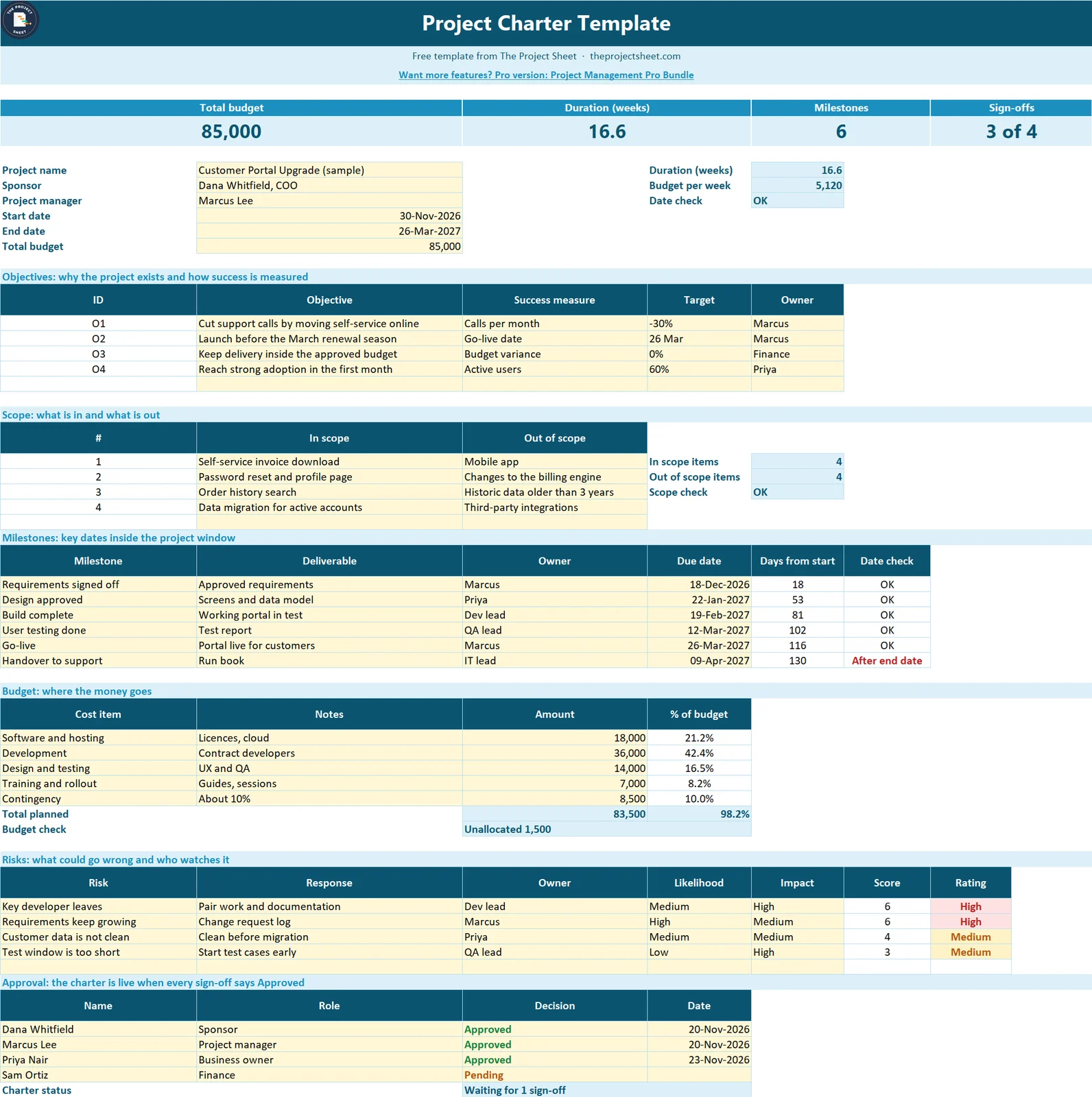
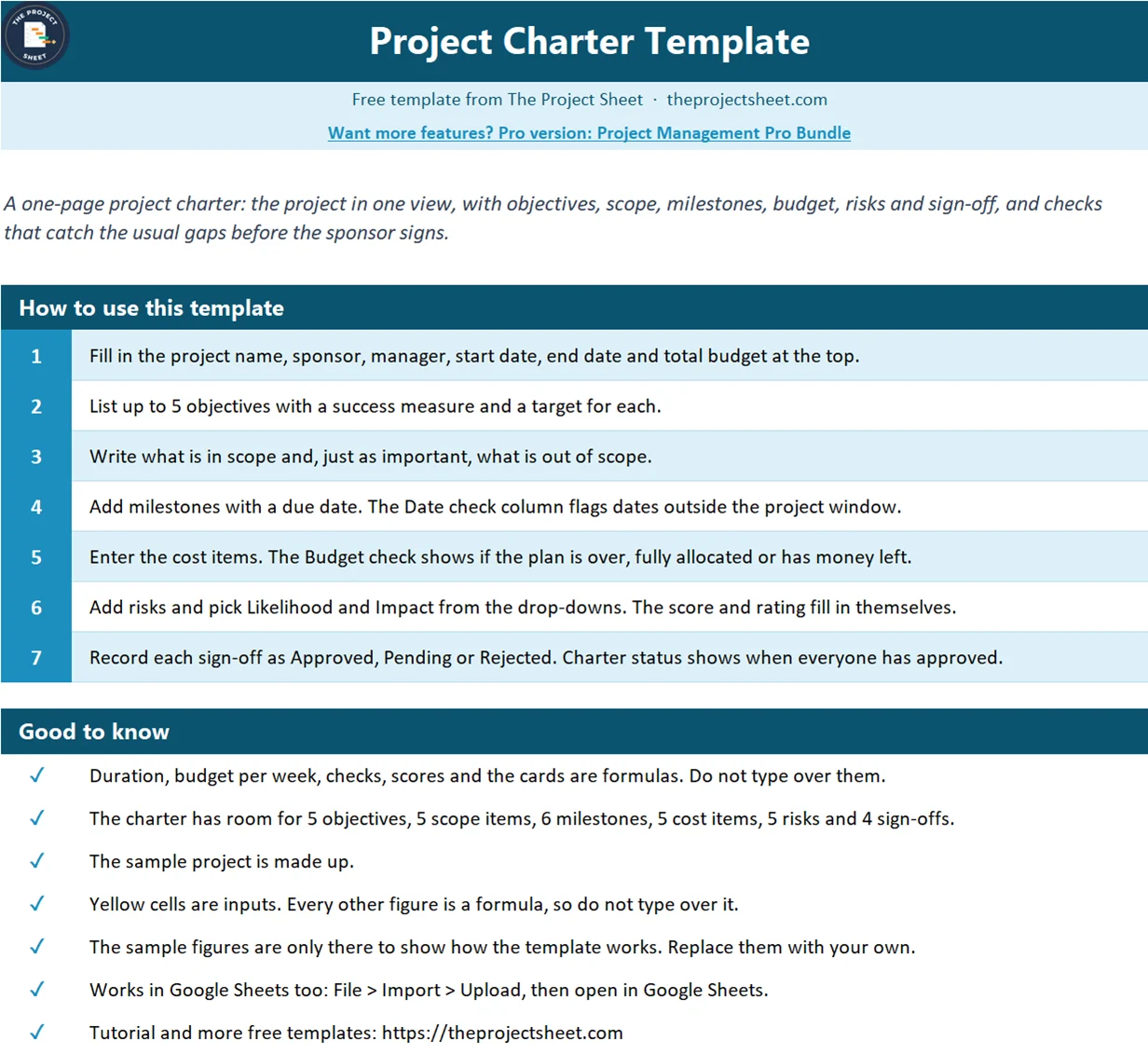
The workbook has two sheets: How to use and Project Charter. The charter sheet has four cards at the top (total budget, duration in weeks, milestones and sign-offs) and six blocks below them: project basics, objectives, scope, milestones, budget, risks and approval. It has no macros and also opens in Google Sheets. Yellow cells are inputs and every other figure is a formula.
The example is a made-up customer portal upgrade with a budget of 85,000, a start date of 30 November 2026 and an end date of 26 March 2027. That is 16.6 weeks, or 5,120 of budget per week. Three of four sign-offs are in, so the status reads Waiting for 1 sign-off.
Who this project charter template is for
- A project manager who has to get a sponsor to agree before work starts.
- A small team or agency that needs a lighter document than a full project plan.
- Anyone who keeps hearing “I thought that was included” at the end of a project.
How to build the project charter template in Excel
Start with the basics block in rows 9 to 14: project name, sponsor, project manager, start date, end date and total budget. Everything else in the sheet checks itself against these six cells.
Step 1: Work out the duration and the date check
Put the start date in B12 and the end date in B13. The duration in weeks goes in E9:
=IF(OR(B12="",B13=""),"",ROUND((B13-B12)/7,1))
Dividing the days by 7 gives weeks, and ROUND keeps one decimal. The sample gives 16.6. A simple guard in E11 catches the most common slip, an end date that sits before the start date:
=IF(B13<=B12,"End before start","OK")
Step 2: Write objectives that can be measured
Each objective gets an ID, a success measure and a target. The ID is a formula so it never needs typing:
=IF(B18="","","O"&ROW()-17)
The row number minus 17 gives O1 for the first objective, O2 for the next and so on. An objective with no measure is a wish, so the table has a column that asks for one.
Step 3: Say what is out of scope
The scope block has two columns, in scope and out of scope. Most charters list only what is included. The out of scope list is the one that prevents trouble later. A check in E28 reminds you to fill it:
=IF(E27=0,"List what is out","OK")
Step 4: Check every milestone against the project window
For each milestone, enter an owner and a due date. Two formulas do the rest. Days from start, in E33:
=IF(D33="","",D33-$B$12)
And the date check in F33:
=IF(D33="","",IF(D33>$B$13,"After end date",IF(D33<$B$12,"Before start","OK")))
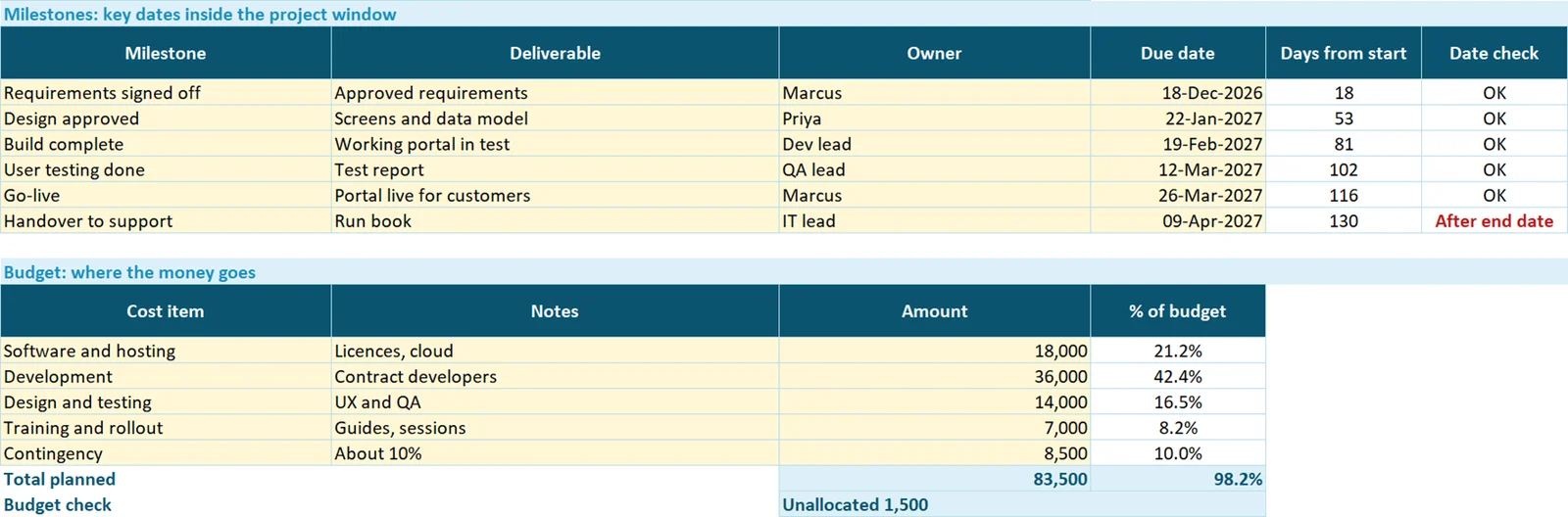
In the example the handover to support is on 9 April 2027, after the 26 March end date, so the sheet flags it in red. Either the end date or the milestone has to change, and now somebody has to decide which.
Step 5: Add the budget and compare it to the total
Enter each cost item with an amount. The share of budget for each line is:
=IF(C42="","",C42/$B$14)
The total sits in C47 as =SUM(C42:C46). The budget check in C48 then says whether the plan is over, fully allocated or has money left:
=IF(C47>B14,"Over by "&TEXT(C47-B14,"#,##0"),IF(C47=B14,"Fully allocated","Unallocated "&TEXT(B14-C47,"#,##0")))
The sample adds up to 83,500 against 85,000, so it reads Unallocated 1,500.
Step 6: Score the risks
Pick Likelihood and Impact from the drop-downs (Low, Medium, High). The score multiplies the two positions in the list:
=IF(OR(D52="",E52=""),"",MATCH(D52,{"Low","Medium","High"},0)*MATCH(E52,{"Low","Medium","High"},0))
Low is 1, Medium is 2 and High is 3, so the score runs from 1 to 9. The rating in G52 turns the score into a word:
=IF(F52="","",IF(F52>=6,"High",IF(F52>=3,"Medium","Low")))
A Medium likelihood and a High impact score 6 and show as High, shaded red.
Step 7: Make the sign-off visible
Each approver gets a decision from a drop-down: Approved, Pending or Rejected. The status in C63 reads the whole list:
=IF(COUNTA(A59:A62)=0,"No sign-offs",IF(COUNTIF(C59:C62,"Rejected")>0,"Rejected",IF(COUNTIF(C59:C62,"Approved")=COUNTA(A59:A62),"Approved","Waiting for "&(COUNTA(A59:A62)-COUNTIF(C59:C62,"Approved"))&" sign-off")))
One rejection beats everything else, and the charter only reads Approved when every listed person has approved. The same logic drives the Sign-offs card at the top.
A worked example with the sample figures
Take the customer portal upgrade. The sponsor reads the card row first: 85,000 budget, 16.6 weeks, 6 milestones and 3 of 4 sign-offs. Then the checks. The date check is fine, the scope check is fine, one milestone is outside the window and 1,500 of the budget is unallocated. Two risks rate High, which is why the charter lists a response and an owner for both.
The conversation that follows is a useful one: move the end date or the handover, and decide where the 1,500 goes. Without the checks, that conversation usually happens in March.
Word-ready: using the charter in a document
Many sponsors want a Word or PDF copy. The sheet is set to print on one landscape A4 page. Use File, Print, Save as PDF to share it, or copy the blocks into a Word table. Keep the Excel file as the working version, so the checks keep running when the dates change.
Common mistakes
- Skipping the out of scope list. It is the part that stops scope creep.
- Vague objectives. “Improve service” cannot be checked. “Cut support calls by 30%” can.
- Milestones outside the project window. The date check exists because this happens in real projects.
- A budget with no contingency. The sample keeps about 10% aside.
- Collecting sign-off by email only. If it is not on the sheet, nobody can see who has not agreed.
- Typing over the formulas. IDs, checks, scores and cards are formulas. Change the inputs instead.
Where to go from here
Once the charter is signed, turn it into a plan with the project plan template for phases and owners. Use the RACI chart template to assign who does what, and the change request template to control anything that changes after sign-off. New to the site? Read start here.

Want more than the free file?
Project Management Pro Bundle: 9 Premium Templates (Excel + Google Sheets)
Nine project management templates in one bundle, so the charter, plan, tracking and reporting all work together.
Your next step: download the file, replace the sample project with yours and fill the basics block first. Then read the checks and settle every flag before you ask for signatures.
Frequently asked questions
What is a project charter template?
A project charter template is a one-page document that states why a project exists, its objectives, scope, milestones, budget, main risks and who has approved it. It is signed before detailed planning starts.
What should a project charter include?
At minimum: project name, sponsor and manager, objectives with measures, what is in and out of scope, key milestones, budget, main risks and the sign-off. This template also checks dates, budget and approvals automatically.
How do I make a project charter in Excel?
Create blocks for basics, objectives, scope, milestones, budget, risks and approval on one sheet. Add formulas for duration, a date check on each milestone, a budget check against the total, a risk score and a sign-off status.
What is the difference between a project charter and a project plan?
The charter is short and answers why, what and how much, and it is approved by the sponsor. The plan comes after it and holds the detailed tasks, dates, owners and dependencies.
Can I use this charter as a Word document?
Yes. The sheet prints on one landscape A4 page, so you can save it as a PDF or copy the blocks into a Word table. Keep the Excel file as the working copy so the checks keep running.
Free download
Project Charter Template practice file (.xlsx)
Working formulas, sample data and a How to use sheet. Opens in Excel, or import it into Google Sheets.
Want the finished version?
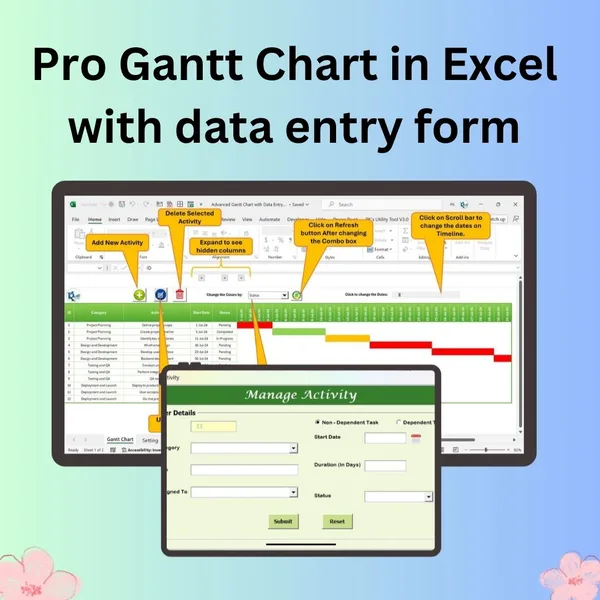
Pro Gantt Chart in Excel with Data Entry Form
Add and update activities through a form while the Gantt chart updates itself.
View the pro template
PK is the founder of PK: An Excel Expert and NextGenTemplates.com and a corporate trainer in Excel, VBA and Power BI. Since 2020 he and his team have built Excel and Google Sheets tutorials and templates for business users, including many project management tools.